
How To Check Your TLS (SSL) Certificate Validity
Authored by Daniel Bunte, Published: 2025-11-14
TLS (Transport Layer Security), commonly referred to as SSL (Secure Sockets Layer), is a protocol that ensures secure communication over the internet. A valid TLS/SSL certificate is crucial for maintaining the security and trustworthiness of your website. In this guide, we’ll show you how to manually check your website’s TLS/SSL certificate validity.
Why are TLS/SSL certificates important?
TLS certificates are essential for encrypting data transmitted between your website and its visitors. They help protect sensitive information, such as login credentials and payment details, from being intercepted by malicious actors. Additionally, having a valid TLS/SSL certificate is a requirement for your website to be accessible over HTTPS, which is the secure version of HTTP.
Why use HTTPS over HTTP?
When the Web was first created, it was designed to be open and accessible. However, this openness also made it vulnerable to eavesdropping and tampering. HTTPS (HTTP Secure) was introduced to address these security concerns by encrypting the data exchanged between the user’s browser and the web server.
If a website uses HTTP only (unsecured), anyone with access to the datastream can read the data being transmitted, which can include sensitive information like passwords, credit card numbers, and personal details. Imagine you’re on a public Wi-Fi network, and you’re logging into your bank account on a website that only uses HTTP. An attacker on the same network could easily intercept your login credentials. With HTTPS, the data is encrypted, making it much more difficult for attackers to read or tamper with the information being transmitted. This is especially important for websites that handle sensitive data, such as e-commerce sites, online banking, and any site that requires user authentication.
Nowadays, every website should use HTTPS by default, and most browsers will warn users if they try to access a site that does not use HTTPS.
Check your SSL/TLS certificate
Visit your website using a browser and click on the icon in the address bar, just next to the URL.
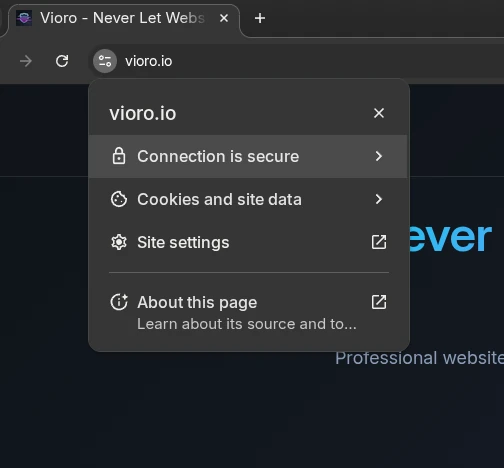
You might need to click on “Certificate” or “Connection is secure” to see the details.

“Certificate is valid” will show you information about your SSL/TLS certificate, including its validity period and the issuing authority.
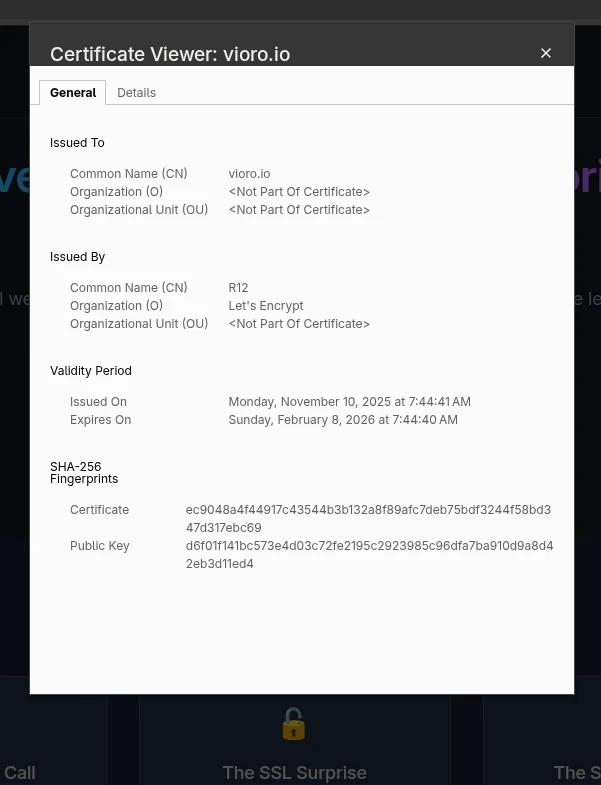
Look out for the Validity Period and Expires On fields. If the certificate is expired, not issued by a trusted authority, or misconfigured, you’ll need to fix it.
Command Line Checking
For technical users, OpenSSL provides detailed certificate information:
# Check certificate expiration
openssl s_client -connect example.com:443 -servername example.com 2>/dev/null | openssl x509 -noout -dates

# Get detailed certificate info
openssl s_client -connect example.com:443 -servername example.com 2>/dev/null | openssl x509 -noout -text
Integration with CI/CD Pipelines
Modern deployment pipelines should include SSL certificate validation:
# Example GitHub Actions step
- name: Check SSL Certificate
  run: |
    EXPIRY=$(openssl s_client -connect $DOMAIN:443 -servername $DOMAIN 2>/dev/null | openssl x509 -noout -enddate | cut -d= -f2)
    EXPIRY_EPOCH=$(date -d "$EXPIRY" +%s)
    NOW_EPOCH=$(date +%s)
    DAYS_UNTIL_EXPIRY=$(( (EXPIRY_EPOCH - NOW_EPOCH) / 86400 ))

    if [ $DAYS_UNTIL_EXPIRY -lt 30 ]; then
      echo "SSL certificate expires in $DAYS_UNTIL_EXPIRY days"
      exit 1
    fi
Ready to prevent your next SSL certificate emergency? Vioro provides comprehensive SSL certificate monitoring with GDPR-compliant European hosting, advanced alerting, and automatic certificate chain validation. Start your free trial and never lose sleep over expired certificates again.

Daniel is the founder of Vioro and has over 20 years of experience in web development and cybersecurity. He holds a CompTIA PenTest+ certification, which showcases his expertise in penetration testing and security assessments. He is passionate about making the web a safer place for everyone and has knowledge in most major programming languages (Rust, Kotlin, Java, PHP, TypeScript, and more), with a focus on security and performance. Daniel has deep experience from different industries, like e-commerce, gaming, energy, and more.
Connect on LinkedIn.